
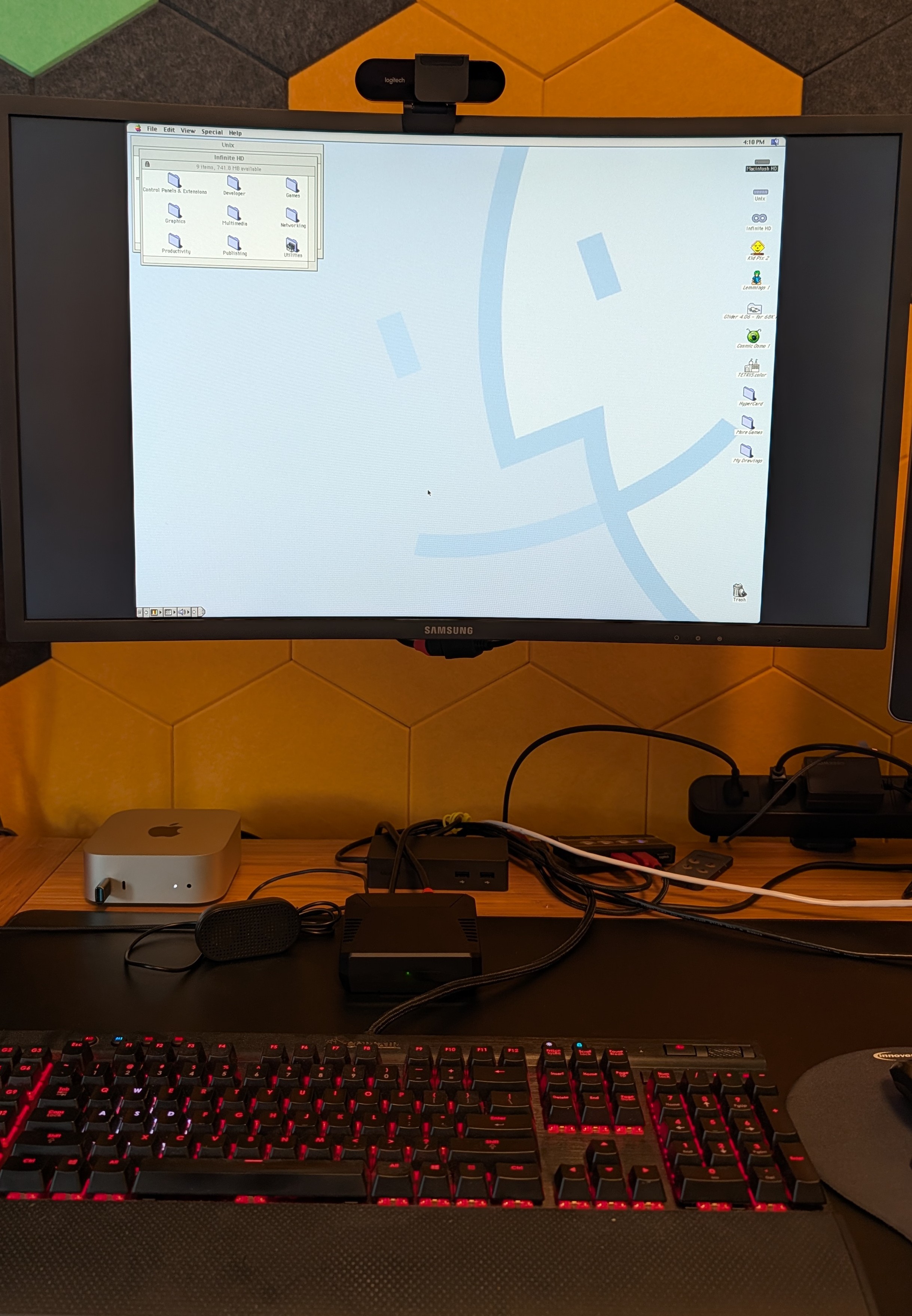
Figure 1
Chimebox in operation: a Raspberry Pi 5 in an Argon ONE V3 case, running Mac OS 8.1 via BasiliskII.
Why I’m writing this
Finding ways to help introduce young people to the power, magic, and wonder of computing has been a recently discovered passion of mine. It’s been a bit of a surprise to me, but when I realized the opportunity, it was obvious that I could do something about it. Today’s landscape has changed from the world I learned in. As a kid of the 90s, my context was fundamentally different — I had early Macs in school, a 486 to call my own, and the family’s 266mhz upgrade expanded our horizons. I realized that kids today just don’t have the same opportunity — they have iPads that abstract away how everything works, modern PCs that inundate them with ads, and an internet landscape that is the stuff of nightmares.
This post is about what I came up with to help introduce my almost-7-year-old niece to the world of computers in a safe and magical way, trying to rekindle that which sparked my own love of the space. From a random thought I had watching YouTubers repair vintage Macs to the first chime of my “Ansibled” Chimebox late one night — this is the thinking, the architecture, and the things that broke along the way.
§1 — The thing I wanted to make
I wanted my niece to have the same kind of “ah-ha” moments I had when I had the opportunity to learn the underpinnings of how computers work. I wanted her to experience the joys of Oregon Trail, know what a “save icon” is a metaphor of, understand that everything is a file on a disk instead of an item in a photo album, find a way to be bored, and feel the excitement of breaking things. At the same time, she needs space to learn and grow without the dangers lurking behind a web browser or chat app.
When watching channels satisfying my current YouTube addiction — Adrian’s Digital Basement , Epictronics , MikeTech , and others — it hit me that she doesn’t have a way to experience what I did. While I enjoy watching them, I don’t have the time or patience (or skill) to do what they do to maintain actual retro hardware. Then I realized what might bridge that gap — a Raspberry Pi 5, with Mac OS 8.1, with a Quadra 650 ROM, period-correct 1024x768 graphics, a real keyboard and mouse, an actual chime, save dialogs, and Kid Pix.
Why retro? I chose retro over more modern approaches for a handful of reasons. For starters, classic Mac OS has the fundamentals — simple mouse design, modal dialogs, an actual desktop, simple multitasking, virtually no internet clutter. It has a rich cultural corpus ideal for children of that age — Oregon Trail, Kid Pix, and MacPaint are iconic and set the tone for millions of people my age. Finally, the emulation and kiosk approach forces a clean separation layer that makes the safety story clear. The kid can’t open a Terminal or browser because they do not exist. The child sees only the Mac, and it feels and behaves like a real Mac.
Why not just use Infinite Mac directly? Infinite Mac is an extremely impressive browser-based emulator of classic Macs maintained by Mihai Parparita, with a highly curated library of period-correct software — and I leaned on it both as inspiration and as a source of the disk images Chimebox uses today. However, the browser model has built-in constraints I needed to break out of: it requires internet (the thing I’m specifically keeping her off), it expects a reasonably capable machine, and its library is closer to “everything ever released for classic Mac” than “the things I’d hand a 6.5-year-old.” It’s a similar target experience that rhymes with what I was looking for, but with some important divergences — both in the physical requirements and the actual target audience.
There’s also the MacintoshPi project, a more direct ancestor that compiles a handful of classic Mac emulators onto a Raspberry Pi 3-class device through a script-driven setup. It was an influence in the early “is this even possible” phase, and the work behind it is genuinely impressive. It started me on this journey originally over a year ago. It didn’t quite work for what I was going for. It was stuck on older Pi hardware and an old Raspberry Pi OS, and is explicitly designed around an internet-connected Mac with modem emulation and telnet BBSs as core features. I also had trouble with the script-based deployments and reproducibility, which led to my motivations to explore Ansible for Chimebox from day 0. I wanted to be able to rebuild a Chimebox from scratch on a fresh device and end up with the same experience every time. Especially when I live hours away from the intended recipient, it’s important that this not need a lot of handholding.
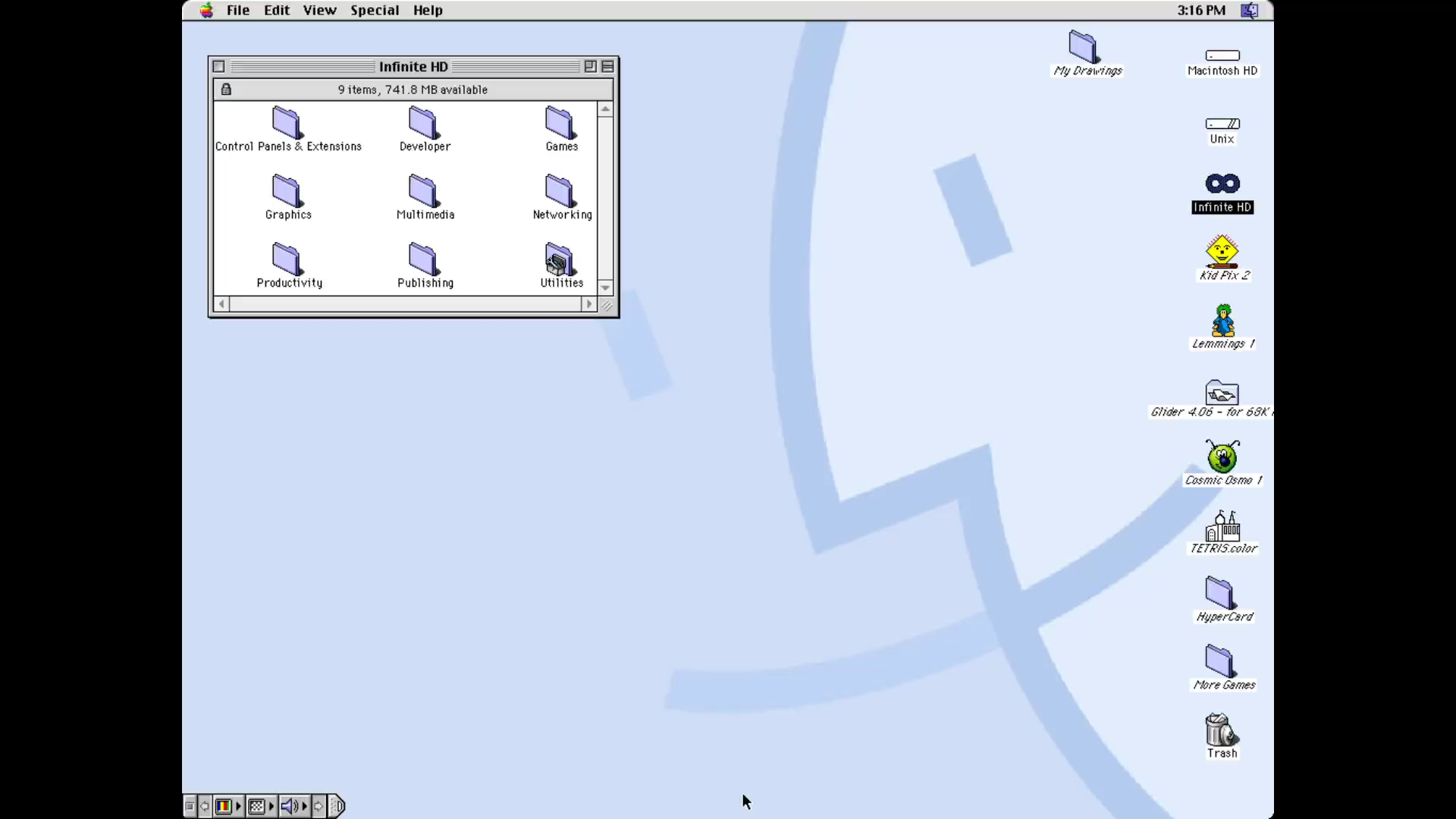
Figure 2
The curated kid-Desktop on first boot — Kid Pix, Oregon Trail, MacPaint, and a Kid’s Drawings folder.
§2 — What “production” means for a 6.5-year-old
“Production” for most kiosks means that they can crash to a “See an Associate” screen. In that context, it’s a minor inconvenience, but to a young child, it can mean that they lose interest, blame themselves, or learn that computers are scary. The bar is different, and with it, the stakes. The project needs to be safe but approachable, closed enough to be reliable and predictable while being open enough for exploration. For my niece, I want her to have a device that sparks something, not one that becomes a chore — a device that has her asking for more in the next year.
One of the first steps of “locking” the experience down was defining what “no internet” means in practice. This is more than just iptables -j DROP — it means that the kiosk user has no NetworkManager access at all. That the egress firewall blocks the kiosk’s UID from reaching anything outside the LAN. That even if the kid opens a web browser in the Mac (whatever that means in today’s SSL’d world), it’d just spin and do nothing. The system is designed assuming someone (me) missed something. The egress-firewall implementation
is one of the few places I trust nothing, including myself.
Another part of reaching “production” quality is that failures aren’t permanent. If Mac OS 8.1 crashes — and it will, it’s Mac OS 8.1, after all — a supervisor loop just relaunches it silently and automatically. If she explores too deeply and breaks Kid Pix’s preferences, a held key combo rolls the entire system disk back to a last-known-good snapshot. And if anything goes sideways — a power yank or outage, a full-on kernel panic — the snapshot layer gives me a recovery path. The contract with her is: explore and break things, this is your sandbox. The contract with myself (and her parents) is: nothing she breaks survives the day. The full snapshot story is in the persistence role’s README
if you want to see how the rotation, factory baseline, and audit trail tie together.
§3 — The architecture (for people who want to know how)
§1 and §2 explained the why — what I wanted my niece to experience, and what “production” had to mean for that experience. This section is the how: the actual stack that makes it work. If you’re not a software person, feel free to skip or skim this; the rest of the post should still make sense without it.
I think about the Chimebox in two views. One is the stack: what’s running at any given moment, and which layer leans on which. The other is the boot flow: how the system gets from power-on to a Mac chime in about ten seconds.
The stack:
   keyboard / mouse / display
        │
   kernel input layer            ← panic-daemon listens here
        │
   X server (DontVTSwitch=true)
        │
   start.sh (supervisor loop)
        │
   BasiliskII (the emulator)
        │
   System.dsk (kid's profile)
   InfiniteHD.dsk (curated library)
The flow, from power-on to a chime:
   power on
     → systemd brings up Debian
     → getty@tty1 autologin as kiosk user
     → ~/.bash_profile execs startx
     → ~/.xinitrc execs start.sh
     → start.sh loops: BasiliskII boots Mac OS 8.1
     → Mac OS 8.1 chime plays
     → Desktop appears, Kid Pix waiting
The next four subsections each take one layer of the stack as the entry point and unpack what it does, why it’s there, and how I learned (sometimes painfully) what the right shape was.
3a. One systemd entry point, one supervisor loop
The whole user-facing surface is getty@tty1 autologin → bash
profile → startx → start.sh (a while true; do BasiliskII; done
loop with a sentinel-file pause).
This is an intentional architecture, not laziness. Having a supervisor enables compelling quality-of-life features like setting bedtime and wakeup flows, monitoring for crashes, and switching between modes — and because the supervisor sits at the top of everything that’s running, killing it tears down the whole stack cleanly, which is exactly what every shutdown path needs. Adding a new emulator when the time comes means replacing one binary, not rebuilding everything. The “polite shutdown” paths reuse the same sentinel.
3b. Why the panic-button reads input below X
Firstly, “panic-button?” One thing about retro software is that it can be finicky — OSs crash and freeze up, emulators do weird things, or kids paint themselves into a corner. I needed to make sure the kid (or her parents) could quickly and easily break out, too.
The thing I’d naïvely expected to be “I’ll just bind a key in xbindkeys” turned into a real architectural pivot. SDL2 with SDL_VIDEO_X11_XINPUT2=1 (which we need for KVM mouse compatibility for products like PiKVM which I use during development and testing) reads keyboard events via XInput2 raw-mode, which bypasses the classic XGrabKey passive grabs that xbindkeys relies on. Result: hotkeys silently lose every race against the focused emulator. What was supposed to help users break out of jail only kept them locked in when it didn’t work.
The fix is to read evdev directly — below X — and dispatch combos at the kernel input layer. A single ~500-line Python daemon (chimebox-panic-daemon) now hosts:
- Force-reset
(
Ctrl+Alt+Shift+R) — emergency reset if and when the emulator or OS locks up and can’t be rebooted. - Kid-reset
(
Ctrl+Alt+Shift+Z, held 1.5s) — undo to last snapshot if and when the kid breaks something (hopefully when!) - Operator escape
(
Ctrl+Alt+Shift+T, held 3s, opt-in) — drop to a Linux console without disturbing the Mac, useful for cases where the device isn’t reachable by SSH.
The held-time gates are belt-and-suspenders: a kid mashing random combos can’t accidentally trigger a destructive rollback in less than 1.5s of holding three modifiers and a specific letter.
3c. The kid never sees the host — and the operator never has to
The point of the project was to be able to provide a believable retro computing experience with modern technology. Having the kid see and deal with the Linux guts underneath breaks that illusion. In ten years, she might be the one writing systemd units. I want her to grow up seeing computing as something familiar — something she can find her way around, something she can break and fix, something she has a claim on. Today isn’t that day, but the goal is to keep that future open for her.
What I optimized for: the kid never sees Linux, ever, period. What I also optimized for: when the operator (her parents with me on the phone) needs to recover something at 8pm Saturday with no SSH path, there’s exactly one keystroke combo that gets to a shell, and it’s in the docs. Easy to execute, hard to trigger accidentally.
When that 8pm Saturday call comes in — kiosk dark, no SSH, parent on the phone — the recovery flow is short. Hold Ctrl+Alt+Shift+T on the kiosk keyboard for three seconds; the kernel-level daemon below X catches it (same daemon from §3b, third combo), and the system switches to a virtual console with a regular Linux login prompt. The parent types the admin credentials I gave them, and they’re in a shell. From there, I can be talked through journalctl, systemctl status, or whatever else is needed. The Mac is still running, untouched, in the background; switching back to it is one more keystroke (Ctrl+Alt+F1).
The combo is off by default
on Chimeboxes that are handed to kids. The reason is obvious as soon as you say it out loud: an opt-in shortcut to an admin login is exactly the kind of thing a curious kid will eventually find. On dev units it’s on via a single host_vars flag. For my niece’s unit, I’ll make a call closer to handoff — the recovery scenarios above are exactly why I’d consider enabling it for her, knowing the security trade.
3d. Disk images, snapshots, and the time-travel safety net
Chimebox relies on a couple of disk images and concepts to make the experience work and feel magical. Of course, System.dsk is the lifeblood of the operation. This is the writable kid-profile disk — basically, “Macintosh HD” on the desktop. Without this, there’s nothing but a disk with a flashing question mark on boot.
Paired with System.dsk is InfiniteHD.dsk, a read-only curated library (~2 GB of period-correct software, fetched from the Infinite Mac CDN or built on-the-fly during deployment). This takes the hard work done by Mihai and team and unlocks a whole era of software — taking it from “what in the world can I do with this old thing?” to “what can’t I do?”
Finally, there’s still an outside world to interact with. In comes outside-world/, a host directory mounted into Mac OS via BasiliskII’s native featureset. This allows the kid to get their Kid Pix drawings out of the sandbox and onto a USB flash drive. It also opens up more compelling use cases in the future.
System.dsk is her sandbox, so we needed a mechanism to restore it to a working state when things go sideways. We accomplish this through daily cron snapshots of the disk image. The snapshots are saved to a rotating directory and can be restored instantly with the recovery combos — hold Ctrl+Alt+Shift+Z to roll back to the most recent snapshot (“undo today”). Additionally, there’s a “blessed” factory.dsk image that lives outside of the rotation. This represents the “factory restore” option and restores the system back to what was first handed to the user. It’s as if nothing even happened.
The three layers of the safety net:
- Rotating snapshots (daily, up to 7 days back)
- Operator-blessed factory baseline (re-blessable on milestones; restorable on demand)
- Auto-detection of stuck/wedged Mac (future work planned)
The full pipeline from “blank disks directory” to “boots into Mac OS 8.1 with the curated library” is documented in disk-prep/README.md
, including the fast-path-vs-full-pipeline split and a note on being a good citizen with the Infinite Mac CDN.
Figure 3
Holding Ctrl+Alt+Shift+Z for 1.5 seconds rolls System.dsk back to the most recent snapshot. A destructive change becomes a no-op in about thirty seconds.
§4 — Real things that broke (in chronological order)
The Chimebox journey was simultaneously exciting and bewildering. From the magic of hearing the chime and seeing the desktop for the first time to trying to figure out why the panic-buttons didn’t do the one thing they had to. Here are five real moments that stuck with me and helped polish Chimebox while providing me with some real learning opportunities. Along the way, I documented each and every unique case — and maybe someday I’ll turn some of them into blog posts like this one.
4a. The first night: the lost cursor
Around midnight on April 30th, about twelve hours after deciding to actually build this, I had Mac OS 8.1 booting on the Pi. The chime played. The Desktop appeared. I plugged in a mouse and reached for the Apple menu, and the cursor zigged across the screen. Then it zagged somewhere else. Then it shot to a corner. Moving the host mouse a millimeter moved the Mac cursor a mile.
The fix turned out to be three lines in the BasiliskII prefs file. init_grab=true — capture the host pointer inside the BasiliskII window and use relative-motion deltas, the way every emulator from the era expects. jit=false — the JIT is x86-only; on aarch64 it falls back to interpreter anyway. idlewait=false — when the Mac is idle, BasiliskII would sleep and wake on input, and the wake cycle introduced visible cursor stutter. Three flags, one config file.
The unexpected win: init_grab=true also means the cursor cannot leave the Mac screen. I’d added it to fix erratic motion. What I’d accidentally built was the right kiosk-cursor behavior for a six-year-old — she can’t drag the pointer off the Mac into some Linux corner she shouldn’t see, because there is no Linux corner the pointer is allowed to reach. The defensive fix and the product feature were the same line. That kept happening throughout the project: the right architectural choice for the kid and the right architectural choice for the operator were almost always the same choice. When they weren’t, that’s when things broke. (Sometimes I caught those late. The chimebox shipped to my dev unit for weeks before I realized it didn’t actually play the boot chime — the project is literally named for the sound the emulator doesn’t make. The fix in the repo is dated within hours of this post going live.)
4b. The Type-10 error and the panic-button pivot
Scenario: loading a saved Kid Pix picture from disk by double-clicking it yields a Type-10 “Sorry, a system error occurred” error — the exact kind of frozen-Mac scenario the panic button was built to handle. The restart button within Mac OS did nothing, and the recovery key combo didn’t respond. SSH was the only path to recovery — fine for me during development, unacceptable for deployment. I had done testing earlier that indicated the combo worked just fine, but for some reason, something was different now.
After intense debugging, I discovered that xbindkeys could “lose the race” to SDL2, never receiving the keyboard events to trigger the recovery. That led to rewriting the implementation from xbindkeys to a roughly 500-line Python daemon that now handles all of the recovery combos in a layer below X so it can’t be preempted. Hitting this quirk early allowed me to write a daemon that covered all the future use cases naturally and correctly. What’s more, it can even serve as a template for any generic kiosk deployment. The full diagnostic arc — including the wrong-first-hypothesis that shipped a partial fix before I understood the real problem — is documented in v2-panic-button-design.md
.
4c. Cleaning a dirty disk warning
Shutting down the Linux host cleanly wasn’t as kind to the Mac OS guest. This led the Mac OS to complain on every boot that it “was not shut down properly,” as, from its perspective, it wasn’t. After scratching my head for a while on how to address this, I discovered that BasiliskII forwards SIGTERM to the guest OS as a “user requested shutdown” signal. This then triggers Mac OS’s standard “Shutdown” prompt, allowing the user to shut the guest OS down cleanly. This wasn’t obvious — it might be documented, but I hadn’t come across it.
So far, the only alternative would have been to handle this in the supervisor layer — i.e., detect when BasiliskII shuts down and then terminate. However, that’s something I wanted to address with more thinking before implementing it just to address a quirk. Once I knew about the SIGTERM behavior, I had a clean graceful-shutdown primitive that respects the guest OS’s (and the kid’s) agency.
This new primitive now sits behind every path that lets the same disk boot again: nightly bedtime, factory-bless, every operator-initiated reboot. There’s a sentinel file that the supervisor checks so it won’t respawn BasiliskII mid-shutdown, and a timeout so a stuck dialog doesn’t hang the operator forever. The fix that ended up mattering was extending this primitive to every shutdown path. Any path that doesn’t honor the primitive is one that produces a dirty disk warning for the kid the next morning.
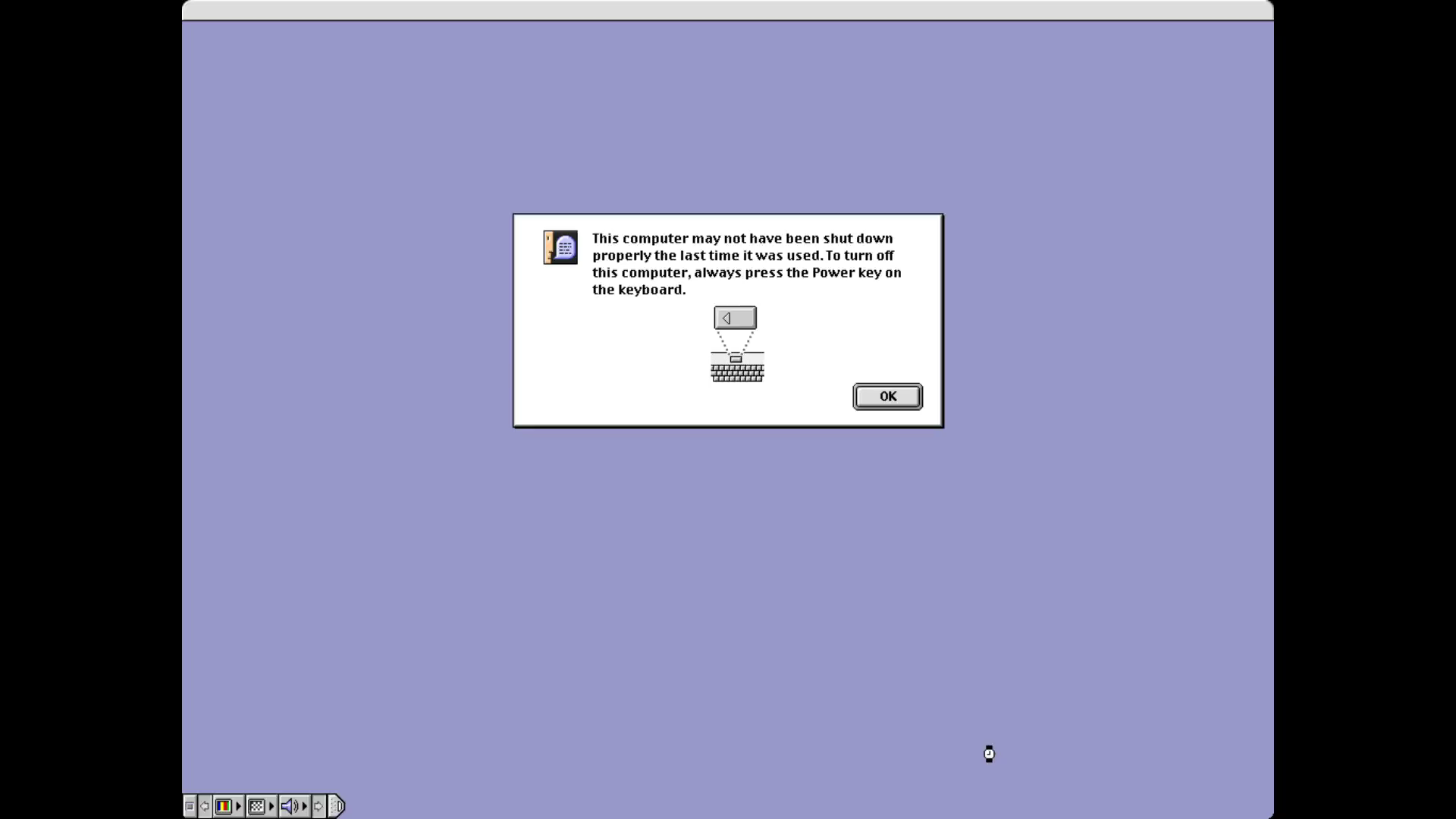
Figure 4
Mac OS 8.1’s ’not shut down properly’ dialog — the symptom that started the §4c story.
4d. Concerning privacy
One aspect I’m adamant about is the right to privacy: folks, especially young people, should be able to explore without having to compromise. It’s one of the fundamental reasons I embarked on this journey to begin with. Part of that includes during the development of the project itself and not disclosing anything about my niece, including her name.
I had designed a privacy scrub that would go through all checked-in files for names, device specifics, etc. This became part of the process to ensure I catch any mistakes early. At one point, her name ended up in a commit draft — I’d thankfully caught it, but it underscored the need to be careful and treat commit messages the same as content.
The repo also documents the layering more formally in Pattern 12 of architecture-patterns.md
: generic examples in the committed configs, real values in gitignored host_vars/<host>/local.yml, and identifying details about the actual kid kept entirely out of the repo. Anything that’s “useful to a stranger” lives publicly; anything that’s “about my niece in her home” doesn’t live anywhere a stranger can reach.
4e. The day before public flip: the operator lockout
As I was building, exploring, and just generally having fun, I realized that I was in danger of suffering from what I’ve coined for myself The Civ Trap. Basically, when working on a project like this, it’s very easy to think to myself “oh, just one more turn!” and add yet another feature. It’s something I love about computing, but is not conducive to actually releasing a project. Relatively early on, I’d decided on a set of features and tasks that would constitute an “MVP” (Minimum Viable Product) that I would be satisfied with making public for anybody to view. Is there still work to do? Of course. But is it at a point where folks could start playing? I think so.
I had finally reached the point where I had satisfied my requirements — all the boxes were checked and the repo was ready. I’d decided to sleep on it that night, so I left the device running and poked at it some. I then realized that it had gone silent. I had it connected to my JetKVM device and it was responsive, but I couldn’t ping it. Everything I pressed went to the Mac, by design. I couldn’t SSH, I couldn’t drop to a shell — I had no way to diagnose what was going wrong. I had to break down and dirty power-cycle the Pi to recover. Cue the facepalm: I’d designed the kiosk so well for the kid that I’d painted myself into a corner and had no way to recover the device cleanly.
It was at this point that I realized that I needed an escape hatch — a way for somebody with the knowledge and ability to drop down into the underlying Linux host to be able to diagnose locally when remote options just don’t work.
The result:
- Optional escape-to-tty combo (configurable
Ctrl+Alt+Shift+Tcombo with a 3s hold to make it hard to press accidentally) - A
net-watchdogrole that pings the gateway every 60s and auto-recovers transient wifi flakes - Docs rewritten to lead with both as the first-choice fixes
- Lockdown role coordinated with panic-button to unmask
getty@tty2.serviceonly when the escape feature is enabled
While the recommendation is to run with ethernet, wifi is obviously a convenient choice for many, so it should be reliable. It can’t be impervious to issues, but these tools help accrue as many 9s as possible. The night before the planned “public flip” on GitHub, I “shipped” a commit at 2am that added a feature designed to address a class of issues. I wish I could say that I’d thought of this upfront, but the honest truth is that the lockout happened because real testing kept surfacing things that I couldn’t have planned for. I’m glad I lived with the device for a few days before doing the flip — this is exactly how I imagine most folks would use the device. Set it up once, leave it on, wake it when they need it.
Lesson: the failure modes you design against are not the failure modes you’ve seen. The kiosk-too-good-to-escape failure was inevitable; the only question was how late I’d learn about it. You can spend countless hours trying to think of every bear trap, but the minute you hand it to your young recipient, they’ll almost certainly find something new to break. You always find the bugs you can’t plan for by living with the thing. The day-before-flip lockout was the device finding mine.
§5 — What I plan to do next
This project has been a lot of fun so far, and I’m excited to see where it goes next. I have a good number of ideas on the roadmap, including:
- Attempting to auto-detect a “wedged” (frozen/crashed) Mac so it can auto-reboot. This can use the lessons from the existing daemons’ implementations, use screen diffing to detect if it’s stuck, etc.
- Broaden hardware support to older/cheaper Pis, repurposed laptops, etc. I had a Pi 5 available and chose it for the performance headroom, but it shouldn’t be a hard requirement. I’d love to make Chimebox work on more devices to make it more approachable for more audiences and give older devices a new lease on life.
- Expand to more emulators and systems — PowerPC, Amiga, DOS, Windows 9x, etc. Not only can these unlock more experiences, but there are also some (like Amiga) that I haven’t even tried that I’d love to play with. The existing architecture should lend itself well to this expansion. This also gives her room to grow into more complex concepts.
- Wrapping up polish work for my niece’s birthday. I have a handful of weeks left to iron out the wrinkles, curate more software, ensure the device is rock solid, and more before my planned hand-off date. I have some friends with children that might be able to help with a test run, too!
And then — what actually happens
I plan to have everything ready for her birthday in July. I’ll write a follow-up post afterwards that relays what she gravitated to, what bored her, what broke unexpectedly, what I would do differently once I see it in use, and what other tools a long-term deployment actually needs to be rock solid.
I deliberately split this into two parts. The follow-up deserves its own space, written after the lived experience — not a guess shoved into this one. But I’ll say this much: building this for her, in the literal sense, has been one of the most satisfying things I’ve worked on in years. The part where she actually uses it is going to be a bonus.
§6 — If you want to build one
I hope at least some of this sparked some interest, and if it did, I would love to see folks deploy their own. I’m excited to see if anybody else is interested and how deployments went, their own war stories, and how folks use the project. I encourage folks to poke around the repo and share any feedback. A lot of this was a learning exercise for me, too. This is my first time really exploring Ansible, deploying a kiosk in Linux, and more. I’m sure I didn’t get everything right, so please feel free!
If you’re so inclined, here’s what you need today:
- Hardware: Pi 5, NVMe (preferred for speed and longevity; works fine on microSD), wired ethernet (recommended), active cooler, KB+mouse
- Software:
git clone https://github.com/bryanwintermute/chimeboxand followpi/SETUP.md - Time: ~half a day for the OS+Ansible flow, ~10 minutes for the fast-path disk fetch — plus however long it takes you to legitimately source a Quadra 650 ROM
- Cost: ~$200 USD all-in for the parts I used (Pi 5 8GB, Argon ONE V3 case, cheap NVMe)
- A quick reality check: this isn’t a “v1 polished” project; it’s a “v1 honest” project. The README has a section called “Status & rough edges.” Trust that. I’m working my way towards something I can call polished, but for now, it’s a living project. I’m sure I’ll still find things to stub my toe on. If you hit one first, please file an issue!
§7 — Acknowledgements
I’d like to take a moment to thank especially Mihai Parparita and the Infinite Mac project. Without the outstanding work they did and the generosity of making it open source, this would have been a much larger undertaking. The macemu team for Basilisk II, without which this project would have been virtually impossible. The Macintosh Garden for the cultural preservation and enabling me to share what sparked my love of the space. My niece, who has no idea any of this exists yet. Her parents for being willing to let me share this with her.
Finally, a disclosure: I worked closely with an AI coding agent throughout this project. GitHub Copilot CLI (with Anthropic’s Claude family of models) enabled me to explore spaces I had never had any experience in, kept me in check when my Civ muscle kicked in, kept my thoughts in order, captured lessons along the way so I can learn from them, and even helped draft this very blog post. How I use these tools to be more effective and help myself learn may be its own blog post someday, but for now, I needed to acknowledge it.